
Best Social Media Management Apps in 2026: The Only Guide You Need

Last Updated: September 18, 2026
My first client — a bakery owner in Austin — used to post every morning before opening. Rain or shine, 6 a.m., phone in one hand, coffee in the other. She thought consistency meant being present in real time. Three months in, she was exhausted and her engagement had actually dropped because the posts felt rushed, the captions were typo-riddled, and she kept forgetting about holidays until the day of.
Social media apps fixed that — not by doing the creative work for her, but by getting the logistical mess out of the way. She batched everything on Sundays, scheduled the week, and suddenly had mental space to actually think about what she was saying instead of just scrambling to say something.
That’s the real pitch for these tools. Not efficiency for its own sake. Just getting the noise out of the way so the actual work can happen.
This guide covers the five ‘types’ you need to know about: scheduling, content management, automation, targeted Instagram features and analytics. I‘ll be practical and tell you what each type does and for who, and what the best apps to get for 2026 are.
What Are Social Media Management Apps?
Short version: software that lets you run all your social accounts from one place instead of logging in and out of six platforms before breakfast.
Longer version: the better tools have grown well beyond basic post scheduling. Team approvals, asset libraries, brand monitoring, performance reports and –more and more- AI-supported content creation. The social media management market exceeded $40 billion in 2026. That’s not because businesses have money to burn. It’s because the ROI on these tools, when you actually use them properly, is pretty hard to argue with.
The tricky part is that the category has splintered. Some tools are built for solo creators. Some for agencies handling 40 clients. Some are Instagram-first. Some are analytics-first. Picking the wrong one wastes both money and time — often more time than just doing things manually. So let’s break it down by what you actually need.
Social Media Scheduling Tools
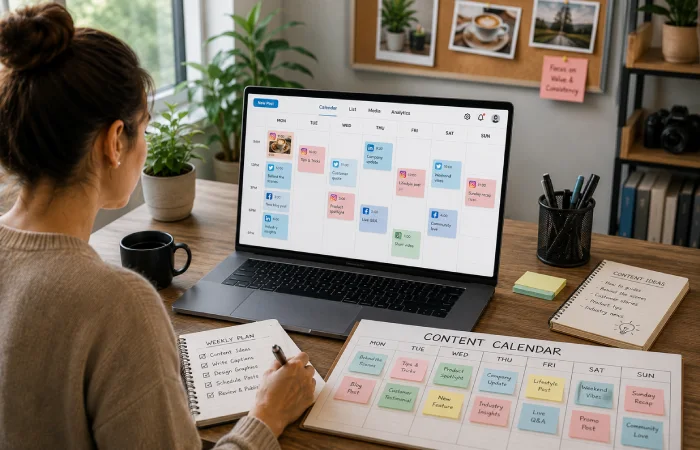
Let‘s be honest: If you can‘t batch-schedule your content then you‘re making your life harder than it needs to be. Actually posting in real time everyday works if only for about two weeks and then it just kindof hides out and sneaks into everything else as a low-grade version of stress.
Scheduling tools enable you to sit down once, twice a week and write everything. These can be loaded into a queue and walked away. The posts go out at the right times — not whenever you happen to remember — and you’re not mentally carrying “I need to post today” around with you all morning.
The best ones now layer on posting-time recommendations based on your actual audience data. Not “research says Tuesday at 11 a.m.” but “your followers specifically are online on Wednesday evenings and Saturday mornings.” That distinction matters more than people think.
Features that separate good schedulers from mediocre ones
- Multi-platform publishing from a single composer — write once, format for each platform
- Drag-and-drop content calendar so you can see the full week without clicking around
- Bulk upload via CSV — essential if you’re managing a lot of content or multiple clients
- Post preview before it goes live, especially for Instagram where formatting breaks unpredictably
- Audience-specific posting time suggestions, not just generic best-practice windows
Honest picks
- Buffer — Still the easiest onboarding experience in this category. If you’re new to scheduling, start here.
- SocialPilot — Purpose-built for agencies. The client management layer is genuinely well thought out.
- Hootsuite — Powerful, but there’s a learning curve. I’d only recommend it if you’re already at scale.
Mini Summary: A good scheduling tool is the first thing you should add to your workflow. Everything else builds on it.
Content Management Apps

Scheduling tells you when something goes out. Content management deals with everything that happens before that — and that’s where most teams actually fall apart.
Who approved this caption? Which version of the graphic was final? Did someone edit the copy after I uploaded it? These questions seem minor until you hit publish on a draft you never wanted to, or two people edit the same post and you lose one of the versions. I have seen it happen to teams of good people with terrible systems.
Content management apps bring structure to the production side. Shared media libraries. Draft workflows. Approval chains. Version history. Some of them now have AI built in — not as a replacement for human writers, but as a starting point that cuts the blank-page problem. In practice, the AI suggestions work best when someone still reads and edits them. Raw AI output tends to sound like… well, raw AI output.
What actually matters here
- Shared media library — one place for all images, videos, and brand files, accessible to the whole team
- Draft and approval workflow — nothing goes live without the right eyes on it first
- Content repurposing tools — turn a blog post into social captions, a webinar clip into a Reel
- AI caption suggestions — treat them as a first draft, not a finished product
- Brand voice checks — some tools will flag posts that sound off-brand before publishing
Who needs this most
Any team with more than two people touching the same content. Solo operators can usually get by with a scheduler and a shared Dropbox. Add a second person and the cracks appear fast.
Worth your time
- Sprout Social — The approval workflows are the best I’ve seen. Expensive, but you feel it in the reduced chaos.
- Loomly — Clean interface, good post suggestion engine, sensible pricing for mid-sized teams
- Later — Strong visual planner, particularly good if Instagram is central to your strategy
Mini Summary: Content management tools don’t just save time — they prevent the specific kind of mistake that makes you cringe for weeks afterward.
Social Media Automation Tools

Automation makes people nervous, and I get it. We’ve all followed brands that clearly have a bot responding to comments. The replies are just slightly off — technically responsive, emotionally hollow. You feel it immediately and it does more damage than just not replying at all.
But that’s bad automation. Good automation doesn’t touch conversations. It handles the infrastructure — the stuff that’s genuinely repetitive and doesn’t require a human brain.
Republishing a post that did well six months ago? Automate it. Sending a weekly performance report to your team? Automate it. Getting notified any time someone mentions your brand online? Automate it. Sure, it‘s easy to reply to a irritated customer who had a poor experience. You‘ll need to take responsibility for it.
What good automation actually handles
- Content recycling — evergreen posts get reshared on a schedule so your archive keeps working
- Social listening alerts brand mentions, competitor activity, relevant keywords all delivered directly to you in real time
- Trigger-based workflows e.g. flag content for repurposing when it reaches a certain performance level
- Inbox tagging — auto-classify incoming messages so your team moves faster
- Scheduled reporting — weekly summaries sent automatically without anyone pulling data manually
My rule of thumb: automate the logistics. Not the relationships. As soon as there‘s automation in contact with a real customer, you need a human in the loop.
Tools that get the balance right
- Hootsuite — Enterprise-grade automation with compliance and approval controls built in
- Zoho Social — Solid feature set at a price that won’t shock your finance team
- MeetEdgar — Laser-focused on content recycling. Does that one thing better than almost anyone.
Mini Summary: Automation frees your team from repetitive work — but only if you’re deliberate about what you hand over to it.
Instagram Scheduling Apps

Instagram needs its own category, since really it has its own set of rules to follow and the majority of general-purpose schedulers simply ignore it.
I learned this the hard way working at a boutique clothing brand whose entire business was conducted through Instagram. We tried a generic scheduler for three months. Posts went out at the right times, sure — but we couldn’t preview the grid before publishing, Stories scheduling was clunky and kept dropping the link sticker, and Reels thumbnails were basically random. The feed looked chaotic. Sales reflected it.
These Instagram-specific tools are designed for the way the platform is designed to function the visual feed, the Stories format, the Reels workflow, the hashtag approach. The difference is felt within week. Many of these capabilities align with Instagram’s own publishing infrastructure outlined in the Meta Business Help Center, which details native scheduling, content publishing, and performance management features available to professional accounts.
Instagram features that generic tools often miss
- Grid preview — plan your visual feed layout before any post goes live
- Reels scheduling with custom thumbnail selection, not just auto-generated frames
- Stories scheduling with correct formatting, stickers, and link placement
- First-comment scheduling — put your hashtags in the first comment at post time, automatically
- Hashtag performance tracking — know which tags actually drive reach vs. which ones are dead weight
Who genuinely needs a dedicated Instagram tool
E-commerce brands. Food and hospitality businesses. Fitness coaches. Creators. Anyone whose revenue is directly tied to how their feed looks and how well their content reaches new people. If Instagram is a secondary channel for you, a general scheduler is probably fine. If it’s primary, don’t cheap out here.
Honest picks
- Later — The grid planner is the best in this category, full stop. If visual cohesion matters to you, this is it.
- Buffer — Simple, reliable, handles Instagram well without overcomplicating things
- Dash Social — Best if you want to connect Instagram content directly to revenue and conversion data
Mini Summary: If Instagram drives your business, use a tool that was actually built for it — not one that bolted on support later.
Social Media Analytics Tools

A confession: I used to skip the analytics step entirely. Post, move on, repeat. It felt like the work was in the creating, not the measuring. I was wrong, and it cost clients real growth.
Analytics tools don’t just show you what happened — they tell you why, and more importantly, what to do differently next month. This shift toward data-driven decision-making reflects broader industry findings highlighted in the Hootsuite Social Media Trends Report, which emphasizes the growing role of performance measurement and ROI reporting in modern social media strategies. Which content format is driving the most profile visits? What day of the week is your audience actually engaged and not just scrolling? How does your engagement rate stack up against competitors in your field? Without data you are ultimately operating solely on vibes.
Most all-in-one platforms include some analytics. But the dedicated tools — or platforms where analytics is a core feature, not an add-on — go much deeper. Especially useful for agencies that need to present results to clients, or brands where leadership wants to see ROI, not just reach numbers.
Metrics worth actually tracking
- Engagement rate by content type — video, carousel, static, Stories all perform differently
- Reach vs. impressions — are new people finding you, or just the same audience seeing you again?
- Click-through rate — are posts driving people to actually do something?
- Follower growth rate — not raw count, the rate of change over time
- Competitor benchmarking — context matters; a 3% engagement rate means something different depending on your niche
One thing worth correcting
Follower count is not a performance metric. I’ve worked with accounts that had 80,000 followers and 0.2% engagement — basically a ghost town. And I’ve worked with accounts at 4,000 followers with 8% engagement and a genuinely loyal community that bought things. Engagement rate is what you want to be growing.
Where to look
- Sprout Social — Best reporting dashboards in this category. The data is well-organized and genuinely easy to present to non-marketers.
- Iconosquare — Deep Instagram and Facebook analytics, good for channel-specific reporting
- Zoho Social — Covers the essentials at a price that makes sense for smaller teams
Mini Summary: Check your analytics. Even once a week changes how you think about content — because you stop guessing and start knowing.
Which Tool Is Actually Right for You?
Here’s the honest answer: it depends entirely on where you are right now. Budget, team size, and which platform drives most of your business — those three factors should determine your choice more than any “best of” list.
| Your Situation | Best Tool Type | Recommended Pick |
| Solo creator or freelancer | Simple scheduler | Buffer or Later |
| Small business (1–5 people) | All-in-one affordable | Zoho Social or Vista Social |
| Growing marketing team | Collaboration-first | Sprout Social or Loomly |
| Agency managing 10+ clients | Multi-account manager | SocialPilot or Sendible |
| Enterprise with compliance needs | Enterprise suite | Hootsuite or Sprinklr |
Almost every tool on this list has a free trial. Use it. Pick two options that seem like a fit, run both for a week, and pay attention to how the interface feels on day seven — not day one when everything is new and nothing is annoying yet.
And don’t overthink the selection process. I’ve watched teams spend six weeks evaluating tools and end up so fatigued by the decision that they stick with nothing. Select something sensible, give it 30 days then modify according to observed friction rather than approaching edge cases.
Final Thoughts
Social media management apps aren’t magic. They won’t fix a bad content strategy or manufacture an audience that doesn’t exist yet. But for the particular problem of maintaining a consistent posting schedule, keeping it all organized over multiple sites, and really knowing what is and isn‘t working they really are useful tools, and in 2026 they are available on just about any budget level.
Start with whatever category is causing you the most friction right now. Disorganized posting? Scheduling tool. Team stepping on each other? Content management. No idea what’s actually working? Analytics. Each section in this guide links deeper resources where you can compare specific tools side by side and nail down pricing.
Your social media stack will probably change as you grow. That’s normal. The goal isn‘t to find the perfect tool for all time it‘s to find the right tool for this particular time and take it from there.

I’m Thomas — Editor & Admin of incmarketingplace, Blogger, and Senior SEO Analyst. writer at Inc Marketing Place, sharing insights on SEO, branding, content marketing, and online business growth. I focuses on creating practical and easy-to-understand content for marketers, entrepreneurs, and growing businesses