
Best Social Media Apps for Content Creators (2026)

Last Updated: September 18, 2026
Platform choice is not where most creator growth problems live. TikTok. Instagram. YouTube. Those audiences are there, and everyone knows it. What is actually broken is usually the infrastructure living beneath it. The editing workflow. The posting cadence. The analytics no one looks at. The monetization structure that isn‘t there yet. Or in a lot of cases, none of those things being in place at all.
Ask a working creator to open their phone and count their social media and content apps. Average is somewhere around twelve to fifteen. Ask them which ones they actually use every week. Usually four or five, maybe six. The rest are experiments that never became habits. Creators who scale consistently are not necessarily more talented — they just have fewer tools, used more deliberately, covering more of the jobs that need covering.
What follows covers five categories: creator economy apps, influencer marketing tools, general creator apps, social media tools built for creators specifically, and video apps. Each section covers the basics and links to a deeper guide.
Creator Economy Apps: Where the Money Actually Comes From

“Creator economy” has been used to mean so many things it barely means anything anymore. Here it means a single category platforms that allows a creator to sell to their following without a brand involved. Patreon, Gumroad, Ko-fi, Beehiiv, Buy Me a Coffee, Substack- tools through which a transaction, full-stop, exists between an individual following and a creator.
Creators typically find this category about two years later than they should. They grind away at the ad-revenue treadmill, pursue brand deals that don‘t come close to matching the value of their audience, then finally discover Patreon or Gumroad, and see that the numbers all make perfect sense. A woodworking creator with 9,000 loyal supporters who use a $12/month Patreon makes more every month than a lifestyle-motivated one with 180,000 followers and ad income. The follower count is not the number that matters here — the engagement and niche depth are.
What’s actually worth knowing here
- Patreon and Ko-fi the two most mature subscription platforms; Patreon half of site users are established creators and Ko-fi is more accessible to relatively small audiences.
- Gumroad best to sell individual digital products: courses, templates, presets, ebooks.
- Beehiiv newsletter platform that has (seriously) taken significant market share away from Substack; also offers more robust revenue-sharing tools for creators wanting to own their audience off-platform.
- Spring (formerly Teespring) — merchandise without inventory; built into YouTube’s creator ecosystem
| The thing most creators get wrong about monetization
The common mistake here is trying to monetize before the audience has any real reason to pay. Brand deals and platform ad revenue need scale first. Direct tools — Patreon, Ko-fi — can work with a much smaller audience if that audience is genuinely engaged with the creator’s niche. Launching a Patreon at 500 semi-engaged followers rarely works. Launching it at 4,000 followers who are deeply into the specific thing you cover often does. |
Influencer Marketing Apps: Getting Found by Brands (and Getting Paid Fairly)

Most creators figure out brand deals the hard way: cold DMs, waiting for inbounds that don’t come, or leaving money on the table by not knowing what to charge. The Influencer Marketing Hub Benchmark Report continues to show sustained growth in influencer marketing investment, reinforcing the importance of professional rate setting, campaign management, and creator-brand marketplaces. There’s a whole category of infrastructure built to solve exactly this problem — brand deal marketplaces, pitch tools, rate calculators, media kit builders — and most working creators have never set any of it up.
These platforms have gotten genuinely better in the last few years. The early versions were essentially paid directories where brands could maybe find you. Now AspireIQ, Collabstr, and similar tools include built-in rate guidance, contract templates, campaign tracking, and direct payments. A creator doing more than one or two brand deals per year without at least one of these platforms is making their life harder than it needs to be.
| Platform | Best For | What Makes It Different |
| AspireIQ | Mid-tier and macro creators | Large brand network; application-based campaigns |
| Grin | E-commerce focused | Deep Shopify integration; good for product-based brands |
| Creator.co | Nano and micro creators | More accessible entry point; lower follower requirements |
| Billo | UGC video specifically | Brands looking for raw, authentic video content |
| Collabstr | All tiers | Self-serve marketplace; fast setup |
What creators consistently get wrong about brand deals
- Undercharging — creator rates are almost always set by what feels safe to ask, not by what the audience engagement actually justifies
- No media kit — when a brand finds a creator they like, the next step internally is a deck or document they can pass around; without one, deals stall
- Skipping the contract — a $500 brand deal with no written agreement is how you end up doing three rounds of revisions you never agreed to and waiting 90 days to get paid
Apps for Content Creators: The Core Stack Most People Are Missing
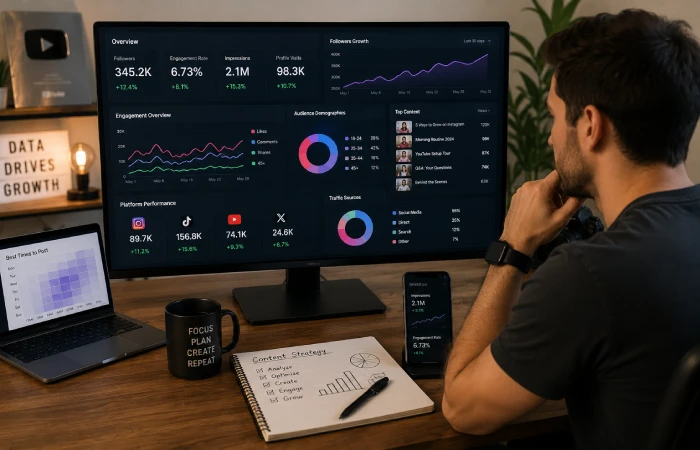
Take away everything that’s niche or optional and working creators need four things: something to make content with, something to schedule it, something to tell them what’s actually working, and something to extend the life of what’s already made. Those four jobs are the floor. Everything in this category is serving one of them.
Native platform tools are convenient and that’s about it. Instagram’s scheduler has meaningful limits. TikTok’s analytics don’t go deep enough to be useful for optimization. YouTube Studio is the best of the bunch but still doesn’t show you anything that’s happening on your other platforms. If the content is going to multiple places — and it should be — the native tools will leave gaps.
The four jobs that need to be covered
- Content creation Canva for graphics and short-form graphics, CapCut for quick video edits, Adobe Express for quicker branded content
- Scheduling Later for visual content, Buffer for simplicity, Metricool for cross-platform analytics and scheduling combined
- Analytics — native platform analytics for individual post data, Metricool or Sprout for cross-platform overview
- Repurposing — Repurpose.io or Opus Clip for automatically turning long-form into short-form clips across platforms

Repurposing is probably the highest-leverage, lowest-adoption category in this whole list. A single 20-minute YouTube video — if it’s been recorded and edited properly — can realistically become ten short clips, three Reels, a LinkedIn thought piece, and a newsletter. Most creators never do this. They post the YouTube video, maybe clip one thing manually, and then start from scratch for the next platform. Opus Clip and Repurpose.io exist specifically to fix that.
Social Media Creator Tools: Built for Creators, Not Just Marketers
Not all scheduling and analytics tools are built for the same person. Enterprise management tools are designed around team approvals, client reporting, and governance. Creator tools are built for one person. Moving fast across visual aesthetical calendars, engagement-centric reporting, fast publishing across all platforms. Marketing-team platform tools are for marketers; doesn‘t work for a solo creator. It works, technically. But it’s built for a different problem.
Where the mismatch shows up most is in analytics. A marketing manager is producing reports for a client or a CMO — impressions, reach, cost per click. A creator is trying to figure out whether the talking-head format or the B-roll-heavy format is driving more follows this month, and whether the Thursday 7pm posting time is actually better than Friday morning. Those questions require different data surfaces and different tool design.
| Tool | Primary Use | Why Creators Use It |
| Metricool | Cross-platform analytics + scheduling | One dashboard for most major platforms; good free tier |
| Later | Visual scheduling, Instagram-first | Drag-and-drop content calendar; link-in-bio tool built in |
| Plann | Instagram and TikTok strategy | Competitor analysis and hashtag tools built for creators |
| Iconosquare | Deep Instagram and TikTok analytics | Audience demographics, reach analysis, profile audits |
| Opus Clip | AI video repurposing | Turns long videos into short-form clips automatically |
On AI tools for creators in 2026 : AI features are baked into almost every creator tool now — captions, clip selection, post-time suggestions, even thumbnail recommendations. Speed and volume, they’re genuinely useful for. Voice and authenticity, they’re not. The creators who use AI as a starting point and then actually edit what comes out do fine. The ones who publish the raw output consistently see it in their engagement numbers.
Video Creator Apps: Short-Form Is the Engine, Long-Form Is the Library
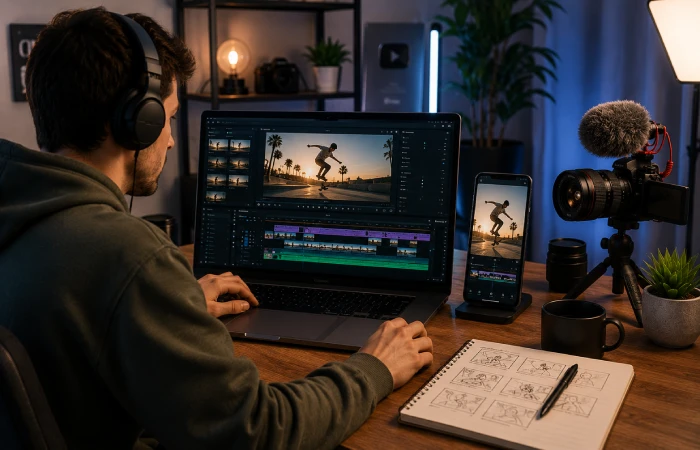
Video stopped being optional at some point in the last two years. Even creators who built audiences on text — LinkedIn, newsletters, Twitter/X — are adding video because the algorithms are rewarding it and because audiences expect it. For anyone whose main format is already video, the editing and production stack is the most consequential tool category of all of these. Get it wrong and the content underperforms regardless of how good the ideas are.
Mobile video editing has reached a point where a phone and CapCut can produce content that performs as well as content edited on a desktop with professional software. That’s a real shift. CapCut specifically has become the default editing environment for short-form video to a degree that’s hard to overstate — it’s in almost every creator’s stack regardless of what else they’re using. The more interesting question in 2026 isn’t whether to use it but what the rest of the setup looks like around it.
Video app stack by use case
- Short-form editing, CapCut (free, godo, constantly updates), InShot (a little more polish UI), Splice (Apple ecosystem)
- Captions and accessibility Captions app, Submagic or the caption feature in CapCut; auto-captions are now table stakes
- Long form editing DaVinci Resolve (free, professional), Final Cut Pro (Mac only), Adobe Premiere, Avid
- Creation of thumbnails Canva, Adobe Express, or Photoshop for those with higher demands for design.
- Distribution and republishing Opus Clip, Repurpose.io, or manual download-and-post whichever applicable.
The video workflow blunder that kills repurposing before it even begins: using the native editor of the platform and never exporting the raw file. TikTok native edits… Live in TikTok. instagram native edits. Live in IG. Neither can be imported into another tool for redistribution or repurposing. Edit in CapCut, DaVinci, or whatever external tool fits the workflow, keep the export, then post everywhere.
What a Creator Stack Actually Looks Like at Different Growth Stages

One of the things no competitor guide covers: the stack at 1,000 followers and the stack at 100,000 followers are basically different products. Early on, cost and friction are the constraints — the tools need to be free or nearly free and dead simple to use. In the middle tier, analytics depth and monetization infrastructure start to matter. At the top of the range, the bottleneck shifts to efficiency and diversification — too many deals to manage manually, too much content to handle without repurposing infrastructure.
| Follower Range | Core Tools | Priority |
| 0–10k followers | CapCut, Canva, free Metricool or Buffer, Ko-fi or Gumroad | Keep cost at zero; focus on content quality and consistency |
| 10k–100k followers | CapCut, Later or Plann (paid), Metricool analytics, one brand deal platform | Add analytics depth; start building brand deal presence |
| 100k+ followers | Full video suite, Opus Clip, Iconosquare, Beehiiv or Patreon, Grin or AspireIQ | Workflow efficiency, monetization diversification, audience ownership |
One thing stays true regardless of follower count: owning the audience somewhere the platform can’t take it away matters. Algorithm changes are real, account restrictions happen, platforms fall out of favor. A creator who has been building an email list alongside their social following is in a fundamentally different position than one who hasn’t. This aligns with guidance from the Content Marketing Institute, which consistently identifies email as one of the most valuable owned-media channels because creators retain direct access to their audience regardless of platform algorithm changes. Beehiiv, ConvertKit, and Mailchimp aren’t replacements for social — they’re insurance against it.
Free audit available : INC Marketing Place works with creators and creator-focused brands who are putting in real work and not seeing it translate into growth. Nine times out of ten it’s a stack problem — either the wrong tools for the stage they’re at, or the right tools being used for the wrong jobs. If that sounds like the situation, incmarketingplace.com is the place to start. First conversation is free and most people come away with a clear sense of what’s actually off.
FAQs
What social media apps do most content creators use daily?
No honest single answer here. TikTok, Instagram, and YouTube are king for most creators, but which one gets the shine depends on the format + audience. On the tool side, CapCut is almost omnipresent for short-form video editing, Canva is in nearly all stacks, for graphics, and the scheduling tool is different across the board Later, Buffer, Metricool… ten working creators would give you 8 different answers.
Do content creators actually need paid apps, or do free tools cover it?
Free tools cover most early-stage needs completely adequately. CapCut costs nothing. Canva’s free plan is legitimately functional for most content graphic work. Buffer and Metricool both have free tiers that handle scheduling and basic analytics. The transition to paid software starts making economic sense when the creator is posting consistently across three or more platforms and starting to care about the data in a serious way — usually somewhere around 10,000 to 20,000 followers. Before that point, money spent on tools is almost always better spent on equipment or spent not at all.
Which creator apps work best for growing a small account from scratch?
Small accounts do not need sophisticated tools. CapCut for video, Canva for graphics, Buffer free tier for scheduling — that’s the entire functional stack and it costs nothing. What kills small accounts isn’t tool limitations, it’s time spent researching and comparing tools that could be spent making content. Lock in the three basics, ignore everything else for six months, then reassess based on what’s actually limiting you.
What’s the difference between creator economy apps and influencer marketing apps?
The creator economy apps Patreon, Gumroad, Ko-fi, Beehiiv are where, the audience pays the creator directly. The influencer marketing apps AspireIQ, Collabstr, Creator.co are where the brand pays the creator to reach the audience. They serve opposite ends of the same monetization question. Most creators end up using something from both categories eventually, but the timing matters. Direct monetization tools can work with a smaller, deeply engaged audience. Brand deal platforms need more scale before they’re worth the setup time.
Are video editing apps more important than social media management apps for creators?
For video-first creators, the editing and production stack has more immediate impact on growth than scheduling and analytics do — nobody follows a creator because their content went out at the optimal time. But, consistency is what will turn viewers into followers and followers into a passionate audience, and this requires management tools. Both are necessary. The question is which one to fix first, and the answer is whichever one is the current bottleneck: if posting is irregular, start with management. If posting is consistent but performance is flat, start with production.
How do successful creators structure their social media app stack?
Look at what successful creators in the 50k to 500k range are actually using and the same structure keeps appearing. One editing tool. One scheduler. One analytics platform that goes beyond what the native apps show. One email or newsletter platform to own the audience off-social. One direct monetization tool. That’s five slots, five jobs. Everything beyond those five is either category-specific or genuinely optional.

I’m Thomas — Editor & Admin of incmarketingplace, Blogger, and Senior SEO Analyst. writer at Inc Marketing Place, sharing insights on SEO, branding, content marketing, and online business growth. I focuses on creating practical and easy-to-understand content for marketers, entrepreneurs, and growing businesses