

PPC Bidding Strategies & Budget Management: Maximize Your Ad ROI
Last Updated: July 1, 2026
Two decisions make or break a PPC account. How you bid. How much you spend. That’s it, really. I’ve sat in on audits where the targeting was dialed in, the copy was tight, the offer didn’t need work — and the account still bled money because nobody had checked whether the bidding strategy and the budget actually fit together. Sounds basic. It gets missed constantly.
So let’s get into the bidding models that matter — manual, Target CPA, Maximize Conversions, Smart Bidding — and a way to size your daily budget so it backs up whatever strategy you pick, instead of fighting it.
Manual vs Automated Bidding
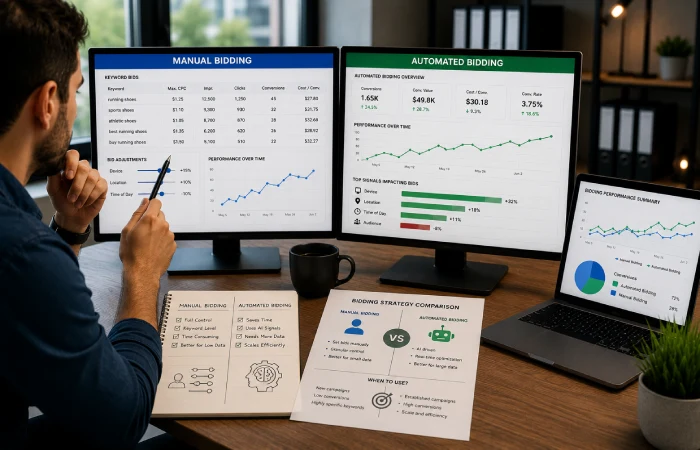
Manual bidding: you set the max cost-per-click yourself, sometimes per keyword. Automated bidding: Google’s model takes over, reacting in real time to device, location, time of day, how likely someone is to actually convert.
People love to argue this is a settled question. It’s not. Automated bidding scales faster than any human ever could, but it’s hungry for data — usually 30+ conversions a month per campaign before it starts making smart calls. Below that threshold? You’re often better off manual, with tight keyword-level control, because the algorithm just hasn’t seen enough yet.
Under 15 conversions a month is a pretty reliable warning sign. I watched one account flip to automated bidding way too early — costs spiked for almost a month before anyone bothered checking whether the data even supported the switch. Nobody caught it because the dashboard “looked fine.”
There’s a middle ground too: Enhanced CPC. You still set the base bid, Google just nudges it within limits. Decent bridge if full automation feels premature.
Target CPA Bidding Strategy

Target CPA tells Google the average you’re willing to pay per conversion. The system chases that number across the whole campaign — not every single auction, just the average. Some conversions cost more, some less.
Works best with some history behind it, generally 15-30 conversions over the past 30 days. Google recommends using Target CPA after campaigns have accumulated sufficient conversion history, allowing the bidding algorithm to make more accurate optimization decisions based on historical performance data [Google Target CPA bidding guide] . Set it too low before that data exists and impressions choke off almost immediately. That’s the opposite of what people are usually going for.
Quick math that tends to land: average sale worth $150, you’re comfortable spending 20% of revenue on acquisition, that’s roughly a $30 Target CPA. Grounded in your actual margins. Not a number lifted from someone else’s case study.
Maximize Conversions Bidding
Does what it says — spends your full daily budget chasing as many conversions as it can find, no CPA ceiling. Cost-per-conversion can swing hard, especially in week one or two.
Good fit when there’s not enough history for Target CPA yet, or when volume matters more than cost precision. Pattern I’d suggest: run it two to four weeks to build a dataset, then move to Target CPA once costs settle. There’s also a hybrid setting — Maximize Conversions with a target CPA — that eases that transition if you’d rather not switch cold.
How to Set a PPC Daily Budget

Budget isn’t just a ceiling. It controls how much data your bidding strategy can gather, which controls how fast Google exits the learning phase after you change anything. Too tight, and even a well-built automated strategy starves.
Starting point: target monthly spend divided by 30.4. Heads up — Google can spend roughly double your daily budget on a busy day, evens out over the month. Google’s advertising documentation notes that daily budgets may temporarily exceed the set amount on high-opportunity days, although monthly spending remains limited by the average daily budget across the billing cycle [Google Ads daily budget documentation]. Not a billing mistake, just how it works.
Here’s where it actually breaks: a $30 daily budget next to a $25 Target CPA goal. Math doesn’t work — not enough room to gather real data each day. Rule of thumb: daily budget at least three times your target CPA, minimum.
Smart Bidding in Google Ads

Smart Bidding is the umbrella term — Target CPA, Target ROAS, Maximize Conversions — all making auction-by-auction calls based on dozens of signals at once. Google explains that Smart Bidding uses machine learning to evaluate real-time auction signals such as device, location, time of day, and user behavior to optimize conversion performance at scale [Google Smart Bidding documentation]. Manual bidding can’t touch that scale.
The catch: it depends entirely on clean conversion tracking. Feed it garbage data, it optimizes toward the wrong outcome with total confidence — arguably worse than no automation at all. Any meaningful change (budget, target, conversion action) restarts the learning period, usually one to two weeks. Performance wobbles during that window. Expect it.
Honestly, just don’t touch a Smart Bidding campaign more than once a week. I know it’s tempting after two bad days. Resetting the learning clock constantly is how accounts stay stuck in permanent instability.
Know More : Google Ads PPC Campaigns
Common Mistakes in PPC Bidding and Budget Management
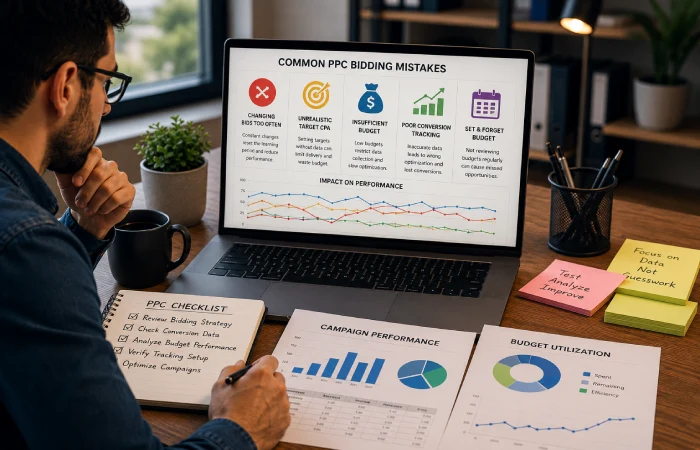
Same handful of mistakes, over and over:
- Switching bidding strategies too often, resetting the learning period each time
- Picking a Target CPA out of thin air instead of from actual margin data
- Underfunding the daily budget relative to whatever strategy is chosen
- Sloppy conversion tracking quietly wrecking every automated strategy built on top of it
- Treating the budget as set-and-forget instead of revisiting it as performance shifts
Myth vs Fact
Myth: Automated bidding always beats manual.
Fact: Only once there’s enough conversion volume to train it. Low data, manual usually wins.
Myth: More budget equals more conversions, always.
Fact: Past a point, extra budget without better targeting just buys more spend. Not more results.
Future Trends in PPC Bidding
More advertisers are moving toward portfolio bid strategies — managing several campaigns toward one shared goal instead of optimizing each in a silo. And as third-party tracking keeps degrading, Smart Bidding is leaning harder on first-party conversion data. Clean tracking stops being optional and starts being the whole game.
Conclusion
There’s no single “best” bidding strategy — that question doesn’t really have an answer. What matters is matching your bidding approach to how much conversion data you actually have, then sizing the budget to support it. Line those two things up, and the account finally gets a real shot.
FAQs
What’s the difference between manual and automated PPC bidding?
You set the bids yourself with manual; with automated, Google’s algorithm adjusts in real time based on conversion likelihood and account history.
How much daily budget do I need for Smart Bidding to work well?
At least three times your target cost-per-acquisition — gives the algorithm room to gather real data instead of running dry before it learns anything.
Is Target CPA better than Maximize Conversions?
Depends where the account is. Target CPA once you’ve got steady volume and a clear cost goal. Maximize Conversions earlier, while you’re still building data.
Why did my campaign performance drop after I changed the budget?
Big budget or target changes usually trigger a new learning period, roughly one to two weeks. Performance gets inconsistent during that stretch. Normal, not necessarily broken.
How often should I adjust my PPC bids and budgets?
About once a week, max. Automated strategies need time to settle — constant tweaking just keeps resetting that clock.

I’m Thomas — Editor & Admin of incmarketingplace, Blogger, and Senior SEO Analyst. writer at Inc Marketing Place, sharing insights on SEO, branding, content marketing, and online business growth. I focuses on creating practical and easy-to-understand content for marketers, entrepreneurs, and growing businesses