
Best AI-Powered Social Media Apps in 2026 (And How to Actually Use Them)

Last Updated: September 18, 2026
Let me say something that may not be popular: the vast majority of users of AI-driven social media apps aren’t actually using the apps. They just sign on, generate a caption or two, and return to what they were doing before.
The brands I have watched grow fastest this year are doing something different. They are not using one AI tool. They are running a stack — content creation, scheduling, analytics, automation — and each layer connects to the next. It looks complicated from the outside. In practice, once it is set up, it runs mostly without you.
This guide discusses each category of AI social app, what it actually does, which tools do it well, and where to find deeper info when you‘re ready. Read the sections relevant to your current gaps. Skip the ones that do not apply yet.
AI Social Media Tools: Pick a Foundation First

The term “AI social media tool” gets thrown at everything now. Schedulers, analytics dashboards, writing assistants, design platforms — they all call themselves AI tools. So before anything else, it helps to separate what actually uses machine learning in a meaningful way from what is just a chatbot wrapper on top of a basic feature.
The platforms doing this well in 2026 share a few things in common. They learn from your account’s specific performance history. They adjust recommendations over time. According to the Hootsuite Social Trends Report, organizations increasingly use AI-driven analytics and automation to improve content performance and decision-making across social channels. And the AI is integrated into the workflow so that it doesn‘t just sit off to the side as a second tab you never use.
Here is where the major players sit right now:
- Hootsuite — Best for teams managing multiple brand accounts. The analytics depth is hard to match.
- Buffer — Cleaner and cheaper. A solid starting point if you are a solo marketer or small team.
- Sprout Social — Built for customer-facing teams. Sentiment analysis is genuinely useful, not just a checkbox feature.
- Publer — Worth watching. Content recycling and AI writing are more thoughtfully integrated than most.
My honest take: start with one. Select the best one to fit your team size and budget, learn how to use it in 60 days, and make the choice to whether you want to add the extra one.
AI Content Creator Apps: More Posts, Less Burnout
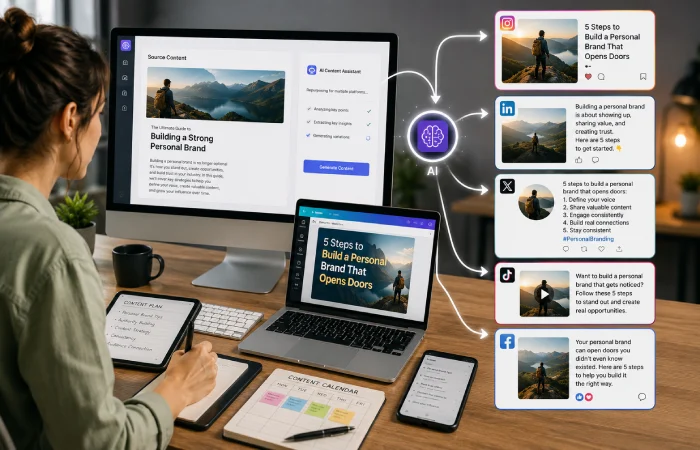
If you are running a brand account on three or four platforms, the content calendar never stops. What worked on LinkedIn needs to be completely rethought for TikTok. A product launch post needs six different versions for six different audiences. A blog post you spent three hours writing gets used once and forgotten.
That is the problem AI content creator apps actually solve. Not the writing — the replication and adaptation. You build something once and the AI handles the reformatting, resizing, and rewriting for each channel.
Some specifics on what this looks like in practice:
Lately is the most interesting tool in this space for content repurposing. Feed it a long-form piece and it pulls out the sharpest hooks and generates ready-to-post captions. It is not perfect. But it cuts the time from article to social calendar from hours to minutes.
Canva’s AI features have become genuinely useful in the last year — not just for design, but for adapting existing assets to new formats quickly. If your team spends time resizing things for different platforms, this alone probably justifies the subscription.
Jasper sits more on the pure writing side. The brand voice training is the standout feature — if you put in the work upfront to define your tone, the outputs actually sound like you wrote them rather than a generic AI.
Worth noting: The tools are most effective if you give them examples to go on. The more context you give the brand voice, audience, platform, goal the better the outcome.
AI Marketing Apps: Stop Posting Into the Void

Here is a scenario I see constantly. A brand posts consistently for months. Content looks good. Engagement is not terrible. But when the marketing lead tries to tie any of it to actual business outcomes — traffic, leads, revenue — the data just is not there.
That is a measurement problem, and AI marketing apps are built specifically to close it. They connect social activity to downstream results and flag what is actually driving outcomes versus what is just filling the calendar.
This matters most for:
- Businesses running paid and organic social together — the attribution gets messy without a dedicated analytics layer
- Marketing teams reporting to leadership — “our posts are doing well” is not a business update
- Agencies managing multiple clients — you need to show ROI per account, not just aggregate metrics
The AI here isn‘t used to create content but to identify patterns. This aligns with guidance from Google Analytics documentation on marketing measurement and attribution, which emphasizes connecting marketing activity to measurable business outcomes rather than relying solely on engagement metrics. These platform surface something such as: this content type consistently performs 40 per cent better for your audience on a Tuesday morning. Or: this campaign drove three times more qualified traffic than any other post this quarter. A human analyst could theoretically find these insights — but it would take a lot longer.
ChatGPT Social Media Tools: More Useful Than Most People Think
ChatGPT is not a social media platform. It does not schedule posts or track analytics. But dismissing it as an ordinary writing tool does not do justice to what it can actually accomplish when you approach it as a thinking partner.
The marketers getting the most from it are not using it to generate finished captions. They are using it at the messy, early stage of content planning — where you have a rough idea, a product update, or a list of talking points, and you need to figure out what angle to take.
Some of the most practical uses I have come across:
- Stress-testing a headline before committing — ask it to poke holes in your angle or suggest five alternatives
- Building a content calendar from a rough brief in minutes rather than spending an afternoon on it
- Drafting responses to the ten most common DM types your brand gets — a huge time saver for community management
- Rewriting the same post in five different tones to get the one that truly sounds like your brand.
The thing that most of us fall down with ChatGPT and social media, is that we input so little context and then can‘t understand why the responses come across as generic. Before you even ask for anything, tell it what your brand is, who your audience are, what platform you‘re using and what you want to achieve.
Go deeper: Social Media Apps
AI Social Media Automation: Get the Sequence Right
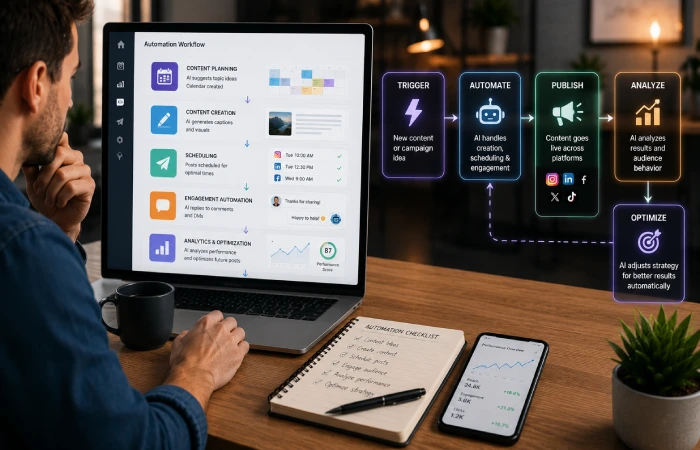
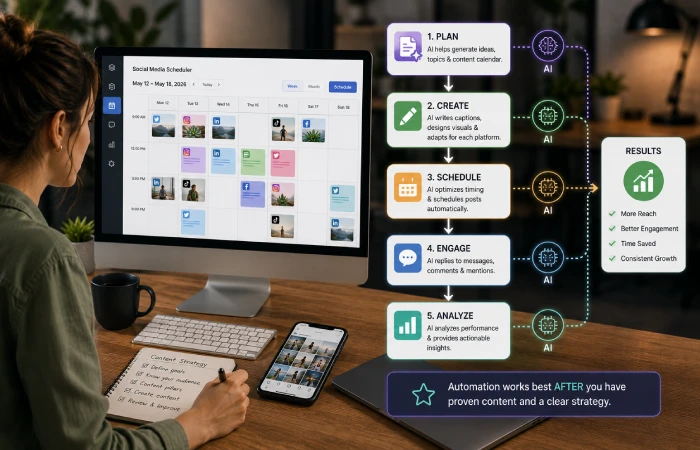
Automation is where most brands either save hours every week or create an efficient machine that produces forgettable content at scale. The outcome depends entirely on the order of operations.
The mistake I see most often: someone sets up automation before they know what works. They automate a posting schedule, a content mix, a set of recycled posts — and then wonder why nothing is growing. You cannot automate your way to a good strategy. You need to find what resonates first, then use automation to maintain and scale it.
Once you have that baseline, here is what modern AI automation handles well:
- Posting time optimization — AI that analyzes your specific audience’s activity patterns and adjusts schedules accordingly, not generic “best times to post” advice
- Evergreen content recycling — platforms like Publer surface older posts that performed well and schedule them for a second run automatically
- Conditional engagement — FeedHive can trigger pre-written follow-up comments when a post hits above-average engagement, a task most teams skip manually
- Cross-platform formatting — one approved post adapted to each channel’s spec without your team touching it
A good way to begin in practice: choose a platform, associate your main channels there and let AI adapt the best time to post on your account during 30 days. See the results before doing more automation anyway.
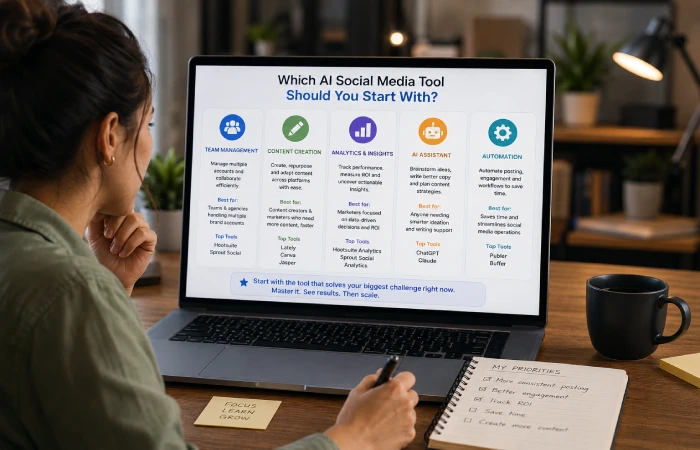
Which Type of AI App Should You Start With?
This is the question most people actually have. Not “what tools exist” — but “what should I do first.” Here is a simple way to figure that out:
| Your Biggest Problem Right Now | Start Here | Tools to Look At |
| Not enough content to publish consistently | AI content creator apps | Jasper, Lately, Canva AI |
| Posting a lot but engagement is flat | AI scheduling and automation | Buffer, Hootsuite, FeedHive |
| No idea if social is driving business results | AI marketing analytics | Sprout Social, HubSpot AI |
| Captions and copy take too long to write | ChatGPT or OwlyWriter AI | ChatGPT, Hootsuite OwlyWriter |
| Visuals are inconsistent across platforms | AI design tools | Canva AI, Adobe Express AI |
One practical note: check platform support before you commit to anything. Some tools are stronger on LinkedIn (Supergrow is built specifically for it). Some are more geared towards Instagram and TikTok. Best AI in the world is useless if it doesn‘t support the platform where your audience actually exists.
Final Thoughts
The brands succeeding on social in 2026 are not the brands with the biggest teams or biggest content budgets. They are the brands that learned how to make all those AI tools work together as a system.
That does not happen all at once. It starts with one tool in the area where you are most stuck. Then another. Then automation once you know what is worth automating. Built gradually, the whole thing becomes something that runs mostly without you — which is the actual goal.
Each section in this guide links to a deeper article. Start with the one that matches your current biggest problem. Come back to the others when you are ready.
Frequently Asked Questions
What are AI-powered social media apps?
They are tools which utilize machine learning algorithms to automate content creation, scheduling, analytics and audience engagement. The practical benefit is having less human hours consumed and improved insights of how certain content does.
Which tool is best for social media content creation?
It really depends on what you need. If it‘s for writing then I would say Jasper or ChatGPT. If it‘s for scaled visual content then Canva ai is going to be one of the best options out there. If you‘re looking for both writers and scheduling then Hootsuit‘s OwlyWriter ai is the most integrated.
Do AI tools actually improve engagement?
Yes, especially with smarter scheduling. Any tool that actually learns when your audience is active day to day will outperform any fixed schedule. Some brands are claiming 25 to 40 percent improvements in engagement from moving to AI-optimized timing.
Is ChatGPT good for social media?
More helpful than you know if you tell it exactly what you want, it can be a powerful tool. Before you use it, tell it your brand voice, target demographic, platform, and goal. Don‘t expect it to do the work for you; its responses are generic if you leave it vague.
Are these tools worth it for small businesses?
Yes. Most offer free tiers or plans starting at nearly $15 a month. For a small team the time you will spend not creating the content pays for itself in the first week.
What exactly is AI social media automation?
Employing AI to manage day-to-day work such as publishing, recycling evergreen ideas, modifying schedules by performance, triggering response engagement so your team devotes effort to strategy instead of menial work.

I’m Thomas — Editor & Admin of incmarketingplace, Blogger, and Senior SEO Analyst. writer at Inc Marketing Place, sharing insights on SEO, branding, content marketing, and online business growth. I focuses on creating practical and easy-to-understand content for marketers, entrepreneurs, and growing businesses