

Social Media Scheduling: How to Plan & Schedule Content
Last Updated: September 25, 2026
You do not need a paid tool to schedule a post longer. Many guides, on this topic have not kept up with that change. This article focuses on the scheduling part of Social media management. It explains what scheduling means today now that native options are available. It also shows why scheduling is worth the effort. It shows how to create a schedule that you will actually follow. It tells you how ahead you should plan. It also points out the mistakes that quietly erase the benefits of scheduling.
Social media scheduling is when you plan posts ahead of time and set them to go automatically on a specific date and time. This happens either through the tools that come with the media platforms themselves or through other programs that help with this task.
What is social media scheduling?
Social media scheduling is when you make a post today and tell the system to send it out on a certain date and time. You don’t have to be online when it goes live. You plan it ahead. Let the system take care of the rest. This way you can prepare posts in advance. Have them go up when its best for your audience. It’s a tool, for managing your social media presence.
The tool landscape has shifted. Instagram’s in-app scheduler now allows accounts to queue posts, carousels and Reels directly. Google Business Profile also has a native scheduling toggle built into the post creation process. Third-party tools still have their value when managing platforms, from one calendar working with teams that require approvals or needing unified analytics across accounts.. For someone running a solo account on just one platform it’s no longer necessary to use a third-party tool just to queue a single post.
What are the benefits of scheduling social media posts?

It gets the posting time back.
Several teams report spending six to ten hours a week just on the act of publishing across platforms, not strategy or engagement, just the manual work of posting. Batching that into one scheduling session reclaims most of that time for the parts of the job that actually need a person.
It keeps a presence consistent even when you’re not online.
A queued post still goes out during a week a vacation or a day full of client meetings. That matters because platform algorithms generally favor accounts that post on a predictable rhythm. They like accounts that don’t go quiet, for stretches. Consistency wins.
It frees up time for the part that actually drives engagement.
Once publishing is handled in advance, the time you’d have spent posting can go toward replying to comments and messages instead, which is consistently the stronger lever for reach and engagement.
How to create a social media posting schedule

Define three to five content pillars.
Fixed themes you return to regularly, rather than deciding what to post from scratch each day, make both batch content creation and scheduling far faster.
Batch content on a set day.
Writing and designing a week or two of posts in one sitting is both faster than producing them one at a time daily and easier to review for quality and consistency before anything goes live.
Pick posting times from your own analytics, not a generic chart.
Every account has an audience that’s active at different times. Think of a best time to post” suggestion as an initial idea. Then check it. Change it by looking at the data, from your own platform after a few weeks of real information.
Vary posting cadence by platform rather than using one number everywhere.
A pace that works on Instagram or Facebook is usually too sparse for X and too frequent for LinkedIn so build cadences, per platform instead of a single blanket posting frequency.
How far ahead should you schedule content?
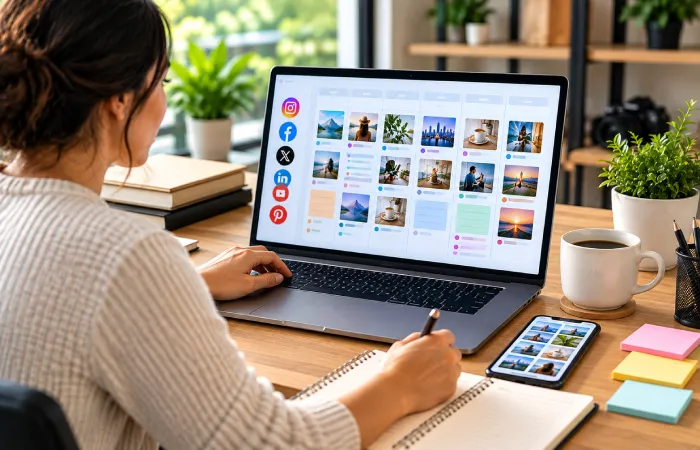
The right lead time depends on what you’re posting. It’s not one number that fits every thing in your calendar. Each post needs its timing based on the content and audience.
Evergreen content, a tip about your craft, an explainer, a how-to can be scheduled weeks or even months ahead without losing relevance. Reactive or timely content, a comment on industry news a response to a trend needs to stay close, to real-time or it risks publishing after the moment has already passed. Scheduling both the way guarantees one of them underperforms.
As a practical range: queue evergreen content one or two weeks in advance, but keep campaigns or seasonal updates scheduled farther ahead. If you‘re scheduling directly through the native Instagram app, Meta‘s official guidelines set it at 75 days in advance, with a maximum of 25 scheduled posts per day a handy upper limit even if you‘re planning much less far in advance.
I find that no matter what range I pick I keep a quarter to a third of calendar unscheduled and open, for posting. A queue that’s completely full has no room left to respond to anything that happens in real time.
Common social media scheduling mistakes

Scheduling so far ahead that content goes stale.
A promotion that’s since changed, a reference to outdated context, or a trend that’s already passed can all end up publishing anyway if a queue was locked in too far in advance and never revisited.
Treating the calendar as done once it’s scheduled.
Scheduling the post is half the job. If you skip the follow‑through reply, to comments or check engagement performance the strongest engagement lever is left unused even though the post went smoothly.
Leaving no room for anything reactive.
A completely full queue can’t respond to breaking industry news, a trending moment, or a customer comment that deserves a timely reply, all of which tend to outperform pre-planned content when they land.
Being too rigid about what’s already on the calendar.
Sometimes a scheduled post does not land well. The context, around a scheduled post changes. If you keep a post just because it was already planned you might lose more than if you change the plan.
Frequently asked questions
How far in advance should I schedule social media posts?
It depends on what the post’s about. Posts that are evergreen can be planned one or two weeks in advance or even more.. Anything that reacts to something happening right now or is connected to current events needs to be scheduled very close, to the actual time. That way it doesn’t come out after the moment has already passed.
Do I need a scheduling tool, or can I use native platform features?
For one person running a platform, native scheduling on Instagram or Google Business Profile now handles most simple needs. A third-party tool starts to make sense when you are handling platforms from one calendar working with a team to get approvals or looking for consistent data, across all accounts.
Does scheduling posts hurt organic reach?
No scheduling itself does not reduce reach. What really affects reach is what happens after the post goes live especially whether anyone follows up to reply to comments because that engagement signals the platform algorithm to distribute the content further.
How many posts should I schedule per week?
There is no number that works for everyone. A pace that you can keep up for months built around the content pillars you have beats a schedule that burns out your team after only a few weeks.
Can I schedule Instagram posts for free?
Yes. Instagrams native in‑app scheduler is free for accounts. It covers posts, carousels and Reels up to 75 days, in advance. However Instagrams scheduler does not yet allow Stories to be scheduled; for Stories you still need Meta Business Suite or a third‑party tool to schedule Stories.
Where to start this week
Pick one social media platform where you are currently sharing posts now instead of planning them ahead and use the scheduling feature that comes with that platform to set up the next seven days of posts. Watch how time it really frees up before you decide if a paid tool is worth buying to go along with it.

Creative marketing enthusiast sharing practical insights on digital growth, branding, and online strategies. Passionate about helping businesses succeed with simple, effective, and result-driven marketing solutions.

