

Header Tags (H1-H6): The Complete SEO Guide for 2026

Last Updated: September 18, 2026
Header tags are one of the most common problems on any given page (font tags substituted instead of heading, jumping from H2 to H4, repeating the same keyword five times in a row). It‘s not even difficult to fix, as long as you know where H1 to H6 actually fit in: minutes to prepare a page structure, not hours, how to target your keywords in it, the answer to multiple H1s, and what habits the editors who make headings work have developed. For the other page-level checklist to put headings into, see on-page SEO essentials.
Header tags refer to the H1 to H6 HTML tags that divide the contents of a web page into a hierarchy of issues and allow search engines, AI engines and users to determine which parts are most important and how they are interconnected.
H1 tag SEO

The H1 is the main heading of a page — the one that states its primary topic. The each page should have the page‘s main keyword, seem like a human headline rather than a label, and be true to what the page actually delivers so that when a reader follows through, they will not be misled. Search engines in fact still tend to use the H1 as one of the strongest indicator of structure within a page For Google’s current guidance on how headings help organize page content, see Google’s guidance on headings and the advance AI programs tend to do the same when they‘re assessing the likely topic of the page before they make the decision whether they should cite it.
A few habits matter more than the tag itself. Create the H1 for a human first – something like “SEO Tips” gives a reader no clue, whereas “Header Tags (H1-H6): The Complete SEO Guide for 2026” clearly describes what the H1 is providing. H1s should be different from the title tag of the page; while they can contain the same keywords, they do not have to, and should not be exactly the same as they appear on two different surfaces. And never use CSS or JavaScript to visually hide an H1 purely to stuff in extra keywords — that reads as manipulative even when it technically isn’t, and it undermines the trust signals search engines increasingly weigh.
Keyword optimization
Bring your primary keyword on the H1, and incorporate secondary keywords in a natural way to fit in the H2s, wherever they make sense – don’t place it in the H2 just because you think every headline should have a keyword. The one failure mode competitors avoid is just the reverse: stuffing the same keyword or similar variation into all H2s until the page becomes a collection of transposed keywords and not a piece of functional writing.
A quick way to find this is by reading only the headings, without the story of what goes underneath. If three H2s in a row all start with the same keywords or line each other up with a “How to X” pattern you‘ve established a preset rhythm that a skimmer will pick up on. Mix up the wording, include some headings that are questions and some declarations, and focus on a heading‘s relevance to topic over a keyword inclusion. A heading that’s accurate but keyword-light still helps a page rank; a heading that’s keyword-dense but vague helps nobody find anything.
Heading hierarchy SEO

A correct hierarchy moves in order — H1, then H2, then H3 — without skipping levels. It might seem harmless but jumping from an H2 straight to an H4 simply because it “looks right” visually breaks the logical outline of the page and causes practical navigation issues for anyone using a screen reader to jump between sections; not just some theoretical SEO concern. This accessibility consideration is also covered in WebAIM’s guidance on heading structure .
Please note: formatting is determined by content, not vice versa. Top-level sections are formatted with H2s. Subpoints within a section that require another level of heading are H3s. Use H4 through H6 only where the content is truly complex: a comprehensive technical documentation page might use them, but anything between 1,500 and 3,000 words should be able to say everything it needs with H2s and a few H3s. If you feel a particular heading level is only needed so the outline doesn‘t look so plain, say by requiring an H3 before the first H2 just to add another “tier,” it‘s probably time to cut down a level.
Multiple H1 tags
The direct answer: using more than one H1 on a page will not get that page penalized by Google, but it’s still worth defaulting to a single H1 for most pages. Those two facts aren’t in conflict — they’re answering different questions.
On the ranking side, Google’s John Mueller has said repeatedly across several public statements that Google’s systems don’t have a problem processing multiple H1 headings on a page, calling it a fairly common pattern on the web. HTML5 also technically supports this: each sectioning element on a page — article, section, aside — can carry its own H1 under the spec’s document outline model, which is where the practice originated in the first place.
On the accessibility side, the picture is less settled. The WebAIM Screen Reader User Survey has shown that people who use screen readers mainly move from heading to heading within pages, so a page with duplicated or ambiguous H1s imposes a real user cost for screen reader users that it imposes on Google‘s crawlers.
The practical takeaway: a single, clear H1 per page remains the safer default, especially for standard articles and product pages. Multiple H1s make the most sense in specific patterns — a long resource page genuinely broken into standalone, self-contained sections under the HTML5 sectioning model, like a help-center index where each topic functions as its own mini-page. Outside of that pattern, one H1 keeps the page’s structure legible for every audience reading it, human, screen reader, or crawler.
Header tag best practices
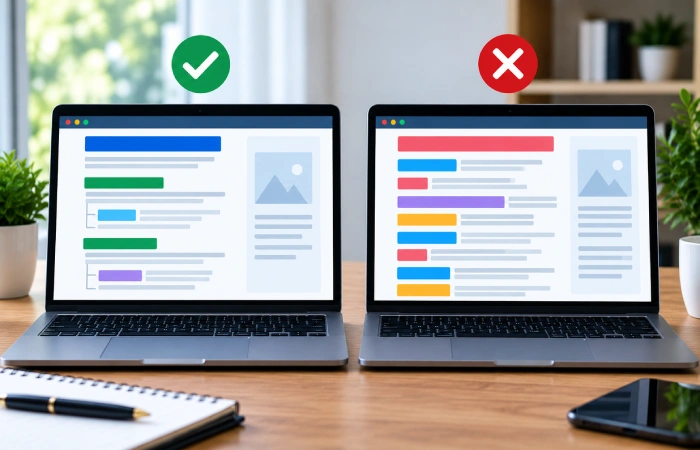
- Use headings to convey meaning, not styling. If the goal is font size or weight, use CSS — reserve heading tags for actual section breaks.
- Keep headings descriptive. “More Details” or “Overview” tells a reader nothing; state what the section actually covers.
- Don’t skip levels. H2 to H3 to H4, in order, following the logic covered above.
- Aim for clarity over length. Most headings land well between about five and twelve words — enough to be specific without becoming a full sentence.
- Vary the rhythm. Not every heading needs to open with “How to” or end with a question mark; repetition across headings reads as templated.
- Audit existing pages periodically. Check live pages for missing H1s, duplicated ones outside the sectioning pattern above, and skipped levels — these are common enough to be worth a recurring check rather than a one-time fix. If you want the full page-level audit process this fits into, the on-page SEO checklist walks through it end to end.
Q&A Access Is More Convenient
What’s the difference between H1, H2, and H3 tags?
H1 is the page’s main heading and states its primary topic. H2s mark major sections beneath it. H3s sit under H2s for supporting subsections that need their own breakout. The hierarchy continues down to H6 for further nesting, though most standard articles never need to go past H3.
How many H1 tags should a page have?
The best rule of thumb is to have just one H1 per page. Even though Google has stated it can handle multiple H1s without negatively affecting your rankings, this is the best approach. You would only apply the multiple H1s rule if your webpage was made up of a number of individual sections following the HTML5 sectioning outline, with an H1 for each section.
Do header tags directly impact rankings?
Less as an individual signal along the lines of a backlink or page speed score. In other words, they serve to inform search engines and AI about a page‘s structure and topical relevance, which then can influence rankings indirectly and is really important for whether a block may be selected for a featured snippet or AI digest.
Is it bad for SEO to use multiple H1 tags?
Not for ranking purposes — Google’s own statements confirm multiple H1s don’t trigger a penalty. It can still create a worse experience for screen reader users, who commonly navigate by jumping between headings, so the accessibility case for a single H1 is stronger than the ranking case against multiple ones.
Should you include keywords in every heading?
No. Place the main keyword in the H1 and naturally include the secondary keywords in H2s where they freely belong. Be forced to have one in every subheading the page gets monotonous to read. There is no ranking benefit over a page that has varied-use keywords and phrase structures.

I’m Thomas — Editor & Admin of incmarketingplace, Blogger, and Senior SEO Analyst. writer at Inc Marketing Place, sharing insights on SEO, branding, content marketing, and online business growth. I focuses on creating practical and easy-to-understand content for marketers, entrepreneurs, and growing businesses

