

Technical SEO: The Definitive 2026 Guide (Audit & Fix)

Last Updated: September 18, 2026
Here‘s a harsh reality about the web many truly interesting pieces will receive almost no traffic. Not because it‘s badly written. Not because nobody’s searching for the topic. But because search engines can’t properly reach it, read it, or store it.
That’s a technical SEO problem. And unlike most marketing problems, it doesn’t respond to more content, more links, or more budget. It responds to engineering.
This guide covers technical SEO from the ground up: how search engines actually process your site, how to make every page crawlable and indexable, how rendering and Core Web Vitals affect visibility, and how to structure your site so it shows up not just in Google’s rankings, but in AI-generated answers from ChatGPT, Perplexity, and Google’s own AI Overviews.
In two layers. First plain-english plans, so you understand everything all-thetime and know why it matters. Then the nitty-gritty so you(and your developers) can actually go and fix it. (Feel free to skip the bold mass if your time is scarce). Bookmark the rest.
What Is Technical SEO?
What is technical SEO, in simple terms? It is simply making your website as easy as possible for the search engines to crawl, render, interpret and index as quickly and as reliably as it is to the humans who use it.
It sits alongside two other disciplines you’ve probably heard of:
- On-page SEO — the content itself: keywords, headings, copy, internal anchor text
- Off-page SEO — signals from elsewhere: backlinks, mentions, brand authority
- Technical SEO — the infrastructure underneath both of them
Think of it this way. On-page and off-page work decide how good your candidate is. Technical SEO is an important factor in determining whether the candidate has the opportunity to walk through that building‘s front door.
In practice, “technical SEO” covers:
- Crawlability (can bots find your pages?)
- Indexability (can bots store your pages?)
- Site architecture and internal linking
- Redirects, status codes, and canonicalization
- JavaScript rendering
- Site speed and Core Web Vitals
- Mobile experience
- Structured data and schema markup
- Security
- International configuration (hreflang)
Why it matters more now than it used to
Three shifts have raised the stakes.
First, Google folded its “helpful content” quality system directly into core ranking with the March 2024 core update, and has run core and spam updates at an unusually fast clip ever since — including the March 2025 core update and a steady rhythm of core and spam refreshes through 2025 and into 2026. The volume of low-value, mass-produced content on the web has forced Google to lean harder on quality and trust signals, many of which are technical in nature: page experience, mobile parity, clean markup.
Second, search results are no longer just ten blue links. Google’s AI Overviews, ChatGPT search, and Perplexity all generate answers and cite sources. For your content to be cited, a machine has to be able to retrieve it, parse it, and quote it. That’s a technical requirement, not a writing requirement.
Third and this is where most companies underestimate the technical debt is a surcharge on every marketing dollar spent thereafter. Even the world‘s most brilliant content team can‘t out-rank a site structure that wastes crawl budget, or a JavaScript framework that presents blank pages to crawlers. Repair the foundation, and all subsequent investments will magnify.
In our audits, we regularly find sites where a single technical misconfiguration — a robots.txt rule, a canonical tag pointing the wrong way — was suppressing a large share of organic traffic.
How Search Engines Actually Work: Crawl, Render, Index, Rank
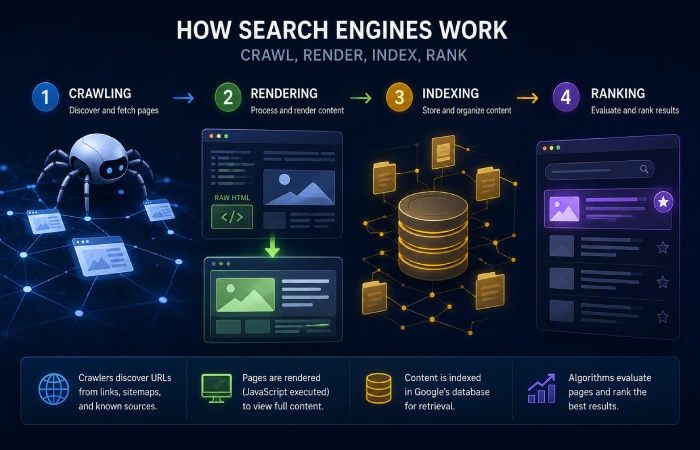
Before you can fix anything, you need an accurate mental model of what Google does with your site. Most people’s model is wrong.
The process has four stages.
Stage 1: Crawling
Googlebot comes across URL‘s from 3 places: links on pages it already knows, XML Sitemaps you submit, and URL‘s it has already seen. It crawls the raw HTML of those pages and extracts out every link, meta tag and piece of text it can find.
Stage 2: Rendering
Here’s where most sites with modern JavaScript frameworks get into trouble. Google uses a two-pass indexing model.
On the first pass, the crawler downloads your raw server HTML. If your site is client-side rendered, that raw HTML is often a near-empty shell — a <div> waiting for JavaScript, a loading spinner, maybe a title tag. The crawler can’t see much. It extracts what it can, then adds the URL to a rendering queue.
Later — anywhere from minutes to days, and in some low-priority cases longer — a second pass happens. The Web Rendering Service (WRS) is part of Google, the engine that renders from a perpetually up-to-date Chromium build (headless chrome browser). It runs your JavaScript and outputs the complete DOM, then your client side content can be seen.
Two consequences follow:
- JavaScript content is indexed with a delay. Sometimes that delay is trivial. Sometimes it isn’t.
- Rendering has a time budget. Google has never published an exact figure, but independent experiments by SEO engineers have measured the cutoff at roughly five seconds of script execution. If your scripts are still settling past that window, execution gets cut off, and Google indexes whatever incomplete DOM it has. Seconds, not minutes. That’s all you get.
Stage 3: Indexing
When a page has been crawled and rendered, Google determines whether it should be indexed and what the canonical URL is if there are duplicates. Pages can be crawled and still not indexed — more on that in the next section.
Stage 4: Ranking
Only now do the ranking signals you usually read about — relevance, links, content quality, page experience — actually get applied.
The takeaway: every stage depends on the one before it. A page that can’t be crawled never gets rendered. A page whose content never renders may never get indexed. And a page that isn’t indexed cannot rank, no matter how good it is. When rankings mysteriously drop, the cause is very often a failure somewhere in this pipeline — which is exactly why the rest of this guide walks through it stage by stage.
Crawlability: Can Search Engines Find Your Pages?
Start with robots.txt
Your robots.txt file is the front office clerk. It directs crawlers as to where they can roam in your domain. It exists at the root of your domain (yoursite.com/robots.txt) and has a few specs which are often overlooked:
- It must be served with a 200 status code
- It must be UTF-8 encoded
- It must be smaller than 500 KiB (yes, oversized robots.txt files are silently truncated)
The most common mistakes we see are blocking CSS and JavaScript files (Google needs these to render your pages properly — blocking them makes your site look broken to the crawler), and over-broad directory blocks that accidentally swallow important pages.
Another thing that couldn‘t be done: exclusion from search results. Google abandoned the use of the noindex directive in robots.txt as early as 2019. To deindex a page requires a meta robots noindex tag so the page needs to be crawlable or else Google won‘t see the tag. Using robots.txt to block a page from crawl and expecting a noindex to follow is a fool‘s errand.
What happens when robots.txt breaks? If the server gets a 5xx response to a robots.txt request it will never crawl your site until the server is available again. If they can‘t get hold of the file for 30 days or more, then Google will fall back to the last cached version of the page (or if there is no cached version, then treat it like there are no restrictions). Either way, control of the front door is lost. Keep this file small, quick and dull.
Site architecture and internal linking
Google discovers pages primarily through links. Three rules of thumb:
- Use real, crawlable links. Standard
<a href>anchor tags. Navigation built purely in JavaScript that requires interaction to expose links is a risk, especially on mobile. - Keep important pages shallow. There’s no official limit, but the common recommendation is that anything important should be reachable within about three to four clicks from the homepage. Deeply buried pages tend to get crawled less, indexed less, and trusted less.
- Eliminate orphan pages. A page with no internal links pointing to it is an island. Sitemaps help Google discover such pages, but internal links are how Google understands importance. If a page matters, link to it from somewhere that matters.
URL hygiene
Boring but valuable. Choose one version of your domain — https, www or non-www, with or without the trailing slash — and redirect everything else to it with a 301. Use a hyphen to separate words and keep urls in lowercase. Don‘t go crazy with long, parameter-heavy urls when you could have simple ones instead. Even one extra url is one more page in the eyes of Google (and every other search engine).
Crawl traps
A crawl trap is any pattern that generates effectively unlimited URLs for bots to waste time on:
- Faceted navigation is the big one. Combine color × size × price × sort filters and a 400-product catalog can generate tens of thousands of thin, near-duplicate URLs. Handle these with a layered approach: disallow useless parameter patterns in robots.txt, canonicalize filtered combinations back to the base category, and be deliberate about which filter combinations deserve indexing.
- Infinite scroll — provide real pagination links as a fallback, because crawlers don’t scroll.
- Calendars with “next day” links that generate infinite future dates.
- Session IDs or tracking parameters baked into URLs.
Crawl budget: what it is, and when to actually care
Crawl budget is how many URLs Googlebot will crawl on your website in a specified period of time, which Google has defined as being influenced by two factors, which it has openly explained as being; crawl rate limit (the maximum number of hits your server can handle before Google reduces its crawl rate, based on response times and errors) and crawl demand (how often Google wants to crawl your URLs, based on their popularity and freshness).
Google’s own guidance is blunt about this: crawl budget mainly matters for large sites — roughly 10,000+ URLs — or sites that add lots of new content quickly. If you run a 60-page site, stop reading about crawl budget and go fix your page speed. If you run an e-commerce catalog or a publisher site, it matters a lot.
You can monitor it in Google Search Console’s Crawl Stats report (total requests, server response codes, and crawl purpose by URL type), and get the fullest picture from server log file analysis — raw logs show you exactly which URLs Googlebot actually hits, how often, and what status codes it gets back. Logs tell the truth about your crawl; everything else is inference.
Indexability: Can Your Pages Actually Get Indexed?

Here is where people get confused: crawled isn‘t the same as indexed. Google can crawl a page and choose not to include it in their index. In Search Console‘s Pages report, you might see statuses such as “Crawled – currently not indexed” and “Discovered – currently not indexed”.
Those statuses generally indicate four possibilities: the page is thin or duplicate; the internal link structure is not strong enough to warrant indexation; the page has been rejected; or Google has deemed the page to be of poor quality. They’re diagnostic gold — go through them template by template.
Canonicalization: telling Google which version is real
Every site has duplicate URLs. Parameters, print versions, pagination, www/non-www variants, staging leaks. Canonicalization is how you tell Google, “this one is the official version; the others are copies.”
The rel=canonical link element is the primary tool, and two facts about it matter:
- It’s a hint, not a directive. Google can ignore it, especially when signals conflict (a canonicalized page that has the most links and sitemap presence, say).
- Self-referencing canonicals are good hygiene. Every indexable template should carry a canonical pointing to its own clean URL. This innoculates pages against parameter and session-ID variants.
For true duplicates, a 301 redirect is cleaner than a canonical. Reserve canonicals for cases where you need the variant URL to exist.
XML sitemaps
Your sitemap is your direct voice to Google. Needs: XML format, maximum of 50,000 URLs or 50 MB (uncompressed) per file (use a sitemap index file if more). Best practices:
- Include only canonical, indexable URLs returning a 200 status. No redirects, no 404s, no noindexed pages — every junk URL in a sitemap wastes trust.
- Keep
lastmoddates honest. Google uses them, but only if they’re consistently accurate. Fake freshness gets ignored. - Submit through Search Console and keep it auto-updated as content changes.
Redirects and status codes
The status codes your server returns are a language, and Google reads them fluently:
- 301 (permanent) — passes ranking signals to the destination. Use for moved pages, domain consolidation, and URL cleanups.
- 302 (temporary) — signals intent to return. Fine for short-term promos; risky as a permanent fix.
- Chains and loops — a redirect that hits a redirect that hits a redirect slows crawls, wastes crawl budget, and dilutes signals. Chains should be flattened to a single hop. Loops are fatal.
- 404 vs 410 — both mean “gone,” but a 410 gets removed from the index faster because it’s unambiguous.
- Soft 404s — pages that return a 200 status but show “page not found” content. They confuse crawlers and waste budget. Search Console flags these.
- 503 with a Retry-After header — the correct way to go down for planned maintenance. Google will back off and return, rather than assuming your site is broken.
noindex — and how people wreck things with it
The meta robots noindex tag removes a page from Google’s index. It works well. It also causes some of the most expensive accidents in SEO: a staging site template going live with noindex still on, a “temporarily” noindexed section that everyone forgot about, a sitewide template change that carried the tag to thousands of pages. If your indexation count drops suddenly, check this first.
International SEO: hreflang
If you serve multiple languages or countries, hreflang annotations tell Google which URL belongs to which audience. Two requirements people miss: tags must be reciprocal (each language version points to all the others, including back to itself), and clean per-locale URL structure (subfolders like /de/ are generally the safest) should come first. Hreflang can live in the HTML head or in your XML sitemap — the sitemap is easier to maintain at scale.
Pagination
Google has deprecated rel=“next” and rel=“prev” (support ended 2019). Now the advice is to make each paginated page a ‘solitary island’, with self-referencing canonicals, unique titles and crawlable links to the items on each page.. Don’t canonicalize page 2, 3, and 4 back to page 1 — that hides content.
JavaScript SEO: Rendering Strategies and the Render Budget

Now the deep end. Remember the two-pass model: raw HTML first, rendered DOM second, with a hard time budget on the second pass. The rendering strategy your site uses determines how well you survive that process.
The four strategies, compared
| Strategy | How it works | Indexing reliability | The tradeoff |
|---|---|---|---|
| CSR (client-side rendering) | Server sends a shell; the browser builds the page with JavaScript | Risky — depends entirely on the render budget and second pass | Cheap to host, but slow first paint and indexing gaps |
| SSR (server-side rendering) | Server builds full HTML on every request | High — crawlers see everything immediately | Higher server cost and infrastructure complexity |
| SSG (static site generation) | All HTML pre-built at deploy time | Excellent — raw HTML is the finished product | Rebuilds required when content changes |
| Hybrid (islands architecture, partial pre-rendering) | Static HTML shell ships instantly; only interactive “islands” hydrate | Excellent — critical content is in the raw HTML | Requires more architectural discipline |
There’s no single right answer, but there is a clear pattern: the more of your critical content and links live in the raw server HTML, the safer your indexing.
The hydration “uncanny valley”
If your site is client-side rendered, users know this experience: the page appears fully loaded — images, text, menus — but nothing responds. You tap a button. Nothing. A link. Nothing. Then, a second or two later, everything wakes up at once.
Developers term this the hydration uncanny valley: the distance between “looks ready” and “actually works”. On slow mobile networks it can be seconds, and customers give up well before then. Crawlers, operating inside their render budget, may cut off before it closes at all. Same underlying cause, two different victims.
Measure it: the Render Ratio (a method we use)
How do you know whether your JavaScript content is actually making it into Google’s index? Here’s a diagnostic we run in audits. To be clear, this is our methodology, not a Google metric — but it reliably surfaces rendering gaps:
- Pick a static string that exists in your raw server HTML on a given template — a hardcoded phrase from the footer or navigation works.
- Pick a unique string that only exists after JavaScript runs — something injected dynamically into the body content.
- Check how many URLs are indexed containing each string, using
site:queries on a sample or, better, pulling indexed URL counts via the Search Console API. - Compare. Render Ratio = URLs indexed with the rendered-only string ÷ URLs indexed with the static string.
A ratio near 1.0 means your client-side content is being indexed as reliably as your static content. A ratio below roughly 0.7 is a red flag — a significant share of your dynamic content is failing the render budget, and you have indexing gaps worth investigating.
Modern architectures, in plain terms
If you’re building or replatforming, the current generation of frameworks solves the CSR problem elegantly:
- Astro’s islands architecture ships zero JavaScript by default and hydrates only the interactive components that need it.
- Next.js partial pre-rendering serves a static shell instantly and streams in dynamic parts.
- Qwik’s resumability avoids hydration work almost entirely.
If replatforming isn‘t an option, the pragmaticities would be: server-side render your most valuable templates, move important content and links into raw HTML, and dramatically reduce javascript payload.
Test your own pages in five minutes
Search Console makes this easy. Open URL Inspection, run a Live Test on a template page, click “View Tested Page,” and open the HTML tab. That’s what Googlebot’s renderer sees. Diff it against view-source (the raw HTML). If your headings, body content, or internal links only exist in the rendered version, you now know exactly where your risk is.
Site Speed and Core Web Vitals

Core Web Vitals are Google’s three standardized metrics for real-world page experience. They’re a confirmed part of Google’s ranking systems (the page experience rollout completed in 2021), but set expectations honestly: Google has consistently described them as a tiebreaker between pages of similar relevance — not a substitute for great content. The bigger business case is that the same speed problems cost you conversions every single day.
The thresholds, straight from Google:
| Metric | What it measures | Good | Needs improvement | Poor |
|---|---|---|---|---|
| LCP (Largest Contentful Paint) | Loading — when the main visible content finishes appearing | ≤ 2.5s | 2.5–4.0s | > 4.0s |
| INP (Interaction to Next Paint) | Responsiveness — latency across all interactions in a session | ≤ 200ms | 200–500ms | > 500ms |
| CLS (Cumulative Layout Shift) | Stability — how much visible content shifts during load | ≤ 0.1 | 0.1–0.25 | > 0.25 |
One distinction that trips up even experienced marketers: field data vs. lab data. Field data (the Chrome UX Report) is measured on real users over a rolling 28-day window — this is what Google actually uses for ranking, and what Search Console reports. Lab data (Lighthouse) is a simulated test on one device; it’s brilliant for diagnosing causes, but it’s not the ranking input. PageSpeed Insights shows you both. Judge yourself by field data; debug with lab data.
INP deserves special attention
INP replaced First Input Delay as a Core Web Vital in March 2024, and it’s a much harder test. FID measured only the first interaction. INP measures the responsiveness of every tap, click, and keypress across the entire session — which means one bloated third-party script firing on a checkout button can fail the whole page, even if the initial load was instant.
The payoff is real. In a case study published on Google’s web.dev, the travel platform redBus improved its INP and measured a 7% increase in sales conversions. Responsiveness is revenue.
How to fix slow INP:
- Break up long tasks. Any main-thread task over ~50ms blocks interaction. Splitting, deferring, and chunking JavaScript is the core fix.
- Audit third-party tags. Chat widgets, analytics, A/B tools, tag managers — these are the usual suspects. Load them lazily, after interaction or idle time.
- Code-split so a given page only downloads the JavaScript it needs.
- Keep the DOM lean and avoid heavy work inside input handlers.
LCP: usually one image
On most pages, the LCP element is the hero image or the largest text block. The fixes are well-mapped:
- Get server response (TTFB) under ~800ms — caching, CDN, faster origin
- Preload the hero image and, whatever you do, don’t lazy-load it
- Use modern formats (WebP, AVIF) with correct
srcsetsizes - Eliminate render-blocking CSS and JavaScript on the critical path
CLS: reserve the space
Layout shift is almost always a space problem.Always specify width/height (or aspect-ratio) explicitly on each image, video and iframe. Leave fixed slots for ads and embeds to prevent other content collapsing when they are inserted. Load web fonts with font-display: swap and preload them. And never inject banners or popups above existing content after load — that’s the single most shift-generating pattern on the web.
Think in templates, not pages
This is the highest-leverage shift in how you approach performance. Google’s Search Console doesn’t evaluate your 40,000 product pages one by one — it groups structurally similar URLs into templates and reports performance at the group level. And a group’s status is dragged down by its worst components.
Which means: one unstable ad slot on your product template can classify thousands of URLs as “Poor” at once. The flip side is the good news — fix it once, and the fix propagates to every URL in the group. That‘s also how you get developer buy-in: no-one wants to fix a page, everyone will fix a template.
Mobile-First Indexing: Parity Is Non-Negotiable
Google implemented the whole mobile first indexing rollout in July 24th 2024. What this means practically: Google has been crawling, indexing, and ranking according to your mobile site. The desktop version is, practically, just an afterthought.
For most modern responsive sites this is invisible. It becomes a problem when the mobile experience quietly offers less than desktop:
- Content that’s collapsed behind accordions or tabs on mobile (fine — Google can index it — as long as it’s present in the mobile HTML)
- Internal links that only exist in desktop navigation
- Structured data present on desktop templates but stripped from mobile
- Images and lazy loading that only trigger on swipe or tap — crawlers don’t interact, so anything requiring a gesture to load is invisible to them. Use native
loading="lazy"instead, which works without interaction.
With roughly six in ten website visits worldwide happening on mobile devices, the honest argument isn’t even about Google. Mobile parity is just… having a real website.
Structured Data: Feed Machines Facts, Not Guesswork
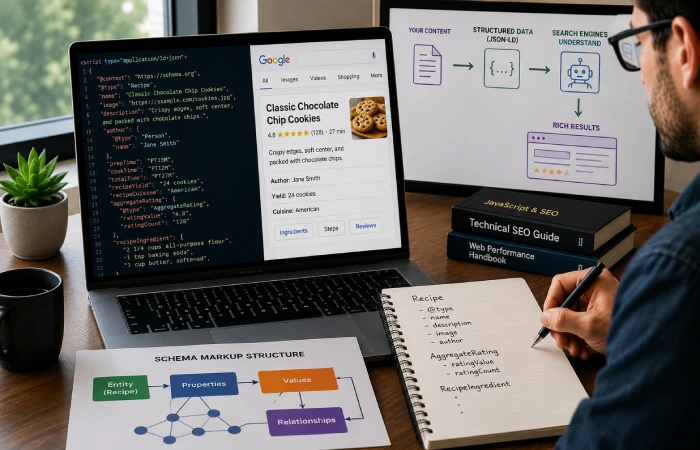
Structured data (schema markup) allows you to provide a clear, explicit, machine-readable description of your page. Instead of trusting an algorithm to get it right, and assume they will “know” that “Jane Doe” was an author, that this is a product costing this much money, thatthis page is answering these questions you simply tell them in a standard language (Schema.org) that all of the most popular automated search engines will read.
Two honest clarifications before the how-to:
- Structured data is not a direct ranking factor. Google has said this plainly, many times. What it does is enable rich results (review stars, product pricing, recipe cards), help Google understand entities on the page, and — increasingly — make your content reliably retrievable by AI systems.
- FAQ rich results are now limited — since 2023, Google displays FAQ rich snippets primarily for authoritative government and health sites. The markup still helps machines parse your Q&A content; just don’t expect the visual SERP treatment.
Use JSON-LD (a <script> block in the page head or body). It’s Google’s recommended format and the easiest to maintain.
The schema types that matter most
| Schema type | Where it belongs | Key properties |
|---|---|---|
| Organization | Sitewide (all pages) | name, url, logo, sameAs |
| Person | Author pages, articles | name, jobTitle, worksFor, sameAs |
| Article | Blog and news content | headline, author, datePublished, dateModified |
| Product | Product templates | name, image, offers (price, availability), SKU |
| FAQPage | FAQ sections | question, acceptedAnswer |
| LocalBusiness | Location/contact pages | name, address, geo, openingHours |
Build a connected graph, not scattered blocks
Most sites implement schema as isolated blocks — a Product here, an Article there, an Organization on the homepage, each with its own duplicated and slowly diverging copy of the company name, logo, and URL. That’s markup debt.
The best pattern is unification a nested graph using json+ld @graph array, one @id for a subject, everywhere else just a copy.
{
  "@context": "https://schema.org",
  "@graph": [
    {
      "@type": "Organization",
      "@id": "https://www.incmarketingplace.com/#organization",
      "name": "INC Marketing Place",
      "url": "https://www.incmarketingplace.com/",
      "sameAs": [
        "https://www.linkedin.com/company/incmarketingplace",
        "https://x.com/incmarketingplace"
      ]
    },
    {
      "@type": "Person",
      "@id": "https://www.incmarketingplace.com/#author",
      "name": "Author Name",
      "jobTitle": "SEO Lead",
      "worksFor": { "@id": "https://www.incmarketingplace.com/#organization" }
    },
    {
      "@type": "Article",
      "headline": "Technical SEO: The Complete Guide",
      "author": { "@id": "https://www.incmarketingplace.com/#author" },
      "publisher": { "@id": "https://www.incmarketingplace.com/#organization" },
      "datePublished": "2026-01-15",
      "dateModified": "2026-01-15"
    }
  ]
}
Every entity declared once. Every relationship explicit. Your author works for your organization. Your article is published by your organization. This is what entity clarity looks like to a machine — and it serves both classic search understanding and the AI retrieval systems we’ll cover next.
The sameAs property deserves a special mention: pointing it at your LinkedIn, your Wikidata entity if you have one, and your other official profiles tells search engines “these are all the same organization.” It’s one of the simplest, most underused trust signals available. Combined with real author markup, it’s the structural backbone of E-E-A-T — the experience, expertise, authoritativeness, and trust framework from Google’s search quality rater guidelines.
Validate, then keep validating
Schema decays. Templates are refashioned, a component is renamed, the markup block no longer matches the content. Have your key templates checked with Google‘s Rich Results Test and the Schema Markup Validator, submit your upgrades to Search Console as an Enhancement, then re-validate with every major release. Deployment is the start, not the finish, of schema maintenance.
Technical SEO for AI Search (GEO)

Generative engines Google‘s AI Overviews, ChatGPT search, Perplexity generate responses through retrieval-augmented generation (RAG). Basically: the model isn t secretly knowing your website. Instead, if someone asks a question, a retrieval layer will go retrieve passages from the web, with the text inserted into the model‘s context, and then the model writes an answer, referencing the passages.
Follow the implication through: if your content can’t be retrieved and parsed cleanly, you cannot be cited — no matter how good it is.
Most of what helps here you’ve already read in this guide, because the fundamentals compound:
- Clean, crawlable HTML — static content survives every render budget trivially
- Clear heading hierarchy and self-contained passages — retrievers chunk content, and well-structured sections chunk cleanly
- Specific, citable statements — clear definitions, concrete numbers, step-by-step processes. AI systems quote specifics, not vibes
- Valid structured data — the
@graphabove gives retrieval pipelines unambiguous facts - Fast, stable pages — the same performance baseline Google rewards
Controlling the AI crawlers
A separate set of bots now exists for AI systems, and treating them as one block is a strategic mistake:
| Bot | Operator | Purpose |
|---|---|---|
| GPTBot | OpenAI | Training data for models |
| ChatGPT-User | OpenAI | Fetching pages for user-initiated requests |
| OAI-SearchBot | OpenAI | Indexing for ChatGPT search results |
| ClaudeBot | Anthropic | Training data |
| PerplexityBot | Perplexity | Indexing for search answers |
| Google-Extended | Controls use of your content for Gemini model training and APIs |
One misconception to kill right now: blocking Google-Extended does not remove you from Google Search or AI Overviews. Those use standard Googlebot, and Google has been explicit about this. Google-Extended only governs training and API use.
The strategic question for each business is: do you want visibility (citations, traffic from AI answers) more than you fear uncompensated training use? Many publishers allow retrieval bots (search citations) while blocking training bots — a reasonable middle path. Decide deliberately in robots.txt, because the default matters.
(A note on llms.txt, a proposed file format for describing site content to AI systems: it’s an interesting convention, but as of now no major engine has committed to reading it. Optional extra, not a requirement. Don’t let anyone sell it to you as essential.)
Security and Trust: Protecting the Equity You’ve Built
Security headers aren’t glamorous, but they protect the thing every other SEO effort depends on: your site’s standing.
The baseline: HTTPS everywhere. It’s been a confirmed, if lightweight, ranking signal since 2014, and every major browser now labels HTTP pages “Not secure.” Migrate properly — sitewide 301s, every internal URL updated, zero mixed content.
Then add the headers that harden the perimeter:
- HSTS — forces browsers to always use HTTPS, preventing downgrade attacks
- Content-Security-Policy — restricts where scripts can load from, blunting injection attacks
- X-Frame-Options (or CSP
frame-ancestors) — prevents your site from being embedded for clickjacking
Why an SEO guide cares: when sites get hacked, the outcomes are catastrophic and fast — safe browsing warnings plastered across your search listings, spam pages injected into your index, and in serious cases, manual actions that remove the site entirely. Recovery is slow. Prevention is a Tuesday-afternoon config change. Keep your CMS and plugins updated while you’re at it.
How to Run a Technical SEO Audit, Step by Step
Here’s the process we use, compressed to its working order:
- Crawl the site with a tool like Screaming Frog or Sitebulb. You’re hunting status code errors, redirect chains, duplicate and missing titles and canonicals, orphan pages, and URL irregularities.
- Open Google Search Console. Work through the Pages report (indexing status, grouped by reason), the Core Web Vitals report (which template groups are failing), Crawl Stats (server responses, crawl purpose), Enhancements (schema health), and — always — Manual Actions and Security issues.
- Compare what’s indexed against what should be indexed. Sitemap counts vs. Pages report counts, spot-checked with
site:queries. - Test rendering on every key template with URL Inspection live tests. Raw HTML vs. rendered DOM — that diff is your JavaScript risk profile.
- Pull field performance data from PageSpeed Insights and prioritize the “Poor” URL groups by traffic value.
- Validate structured data per template.
- Analyze server logs if you can get them — actual bot behavior by directory and template.
- Check the security layer: HTTPS parity, headers (securityheaders.com gives you a free grade), mixed content.
- Consolidate everything into one findings sheet — then prioritize it with the framework below, because you will never fix everything at once.
[ADD REAL EXAMPLE: a real "aha" moment from one of your own audits — this is where first-hand experience does the heavy lifting for credibility]
How to Prioritize Fixes Without Dev-Team Arguments
You’ve got 200 findings and four development sprints. Now what?
Opinions won’t settle it. Math will. We use a prioritization formula adapted from the classic RICE model used in product management:
Priority Score = (Impact × Confidence) ÷ (Effort + Risk)
Score each factor 1–5:
- Impact — how much ranking visibility or revenue is affected if fixed (or lost if not)
- Confidence — how certain you are of the cause-and-effect relationship
- Effort — development time and complexity
- Risk — the chance the change breaks something else (a sitewide robots.txt edit is high-risk; a single canonical fix is low-risk)
Applied to a typical audit:
| Finding | Impact | Confidence | Effort | Risk | Score |
|---|---|---|---|---|---|
| robots.txt blocking CSS/JS and conflicting with sitemap | 5 | 5 | 1 | 1 | 12.5 |
| Faceted URLs missing canonicals (duplicate explosion) | 4 | 4 | 2 | 1 | 5.3 |
| Mobile template hides internal links (parity gap) | 5 | 4 | 3 | 2 | 4.0 |
| Long main-thread tasks failing INP on money pages | 4 | 3 | 3 | 2 | 2.4 |
| Re-architect legacy CSR app to hybrid rendering | 5 | 3 | 5 | 3 | 1.9 |
Read the table and the workflow reveals itself. The robots.txt fix is a ten-minute change with sitewide consequences — do it today. The CSR re-architecture may have the biggest eventual upside, but at high effort and risk, it’s a planned project with its own roadmap, not a sprint ticket. Sequence the quick wins first to fund confidence, then schedule the heavy lifts.
This framework has a side benefit that’s hard to overstate: developers respect it. You’re no longer bringing opinions to a sprint planning meeting. You’re bringing a scored, ranked backlog.
The Technical SEO Checklist
Crawling
- robots.txt returns 200, is UTF-8, under 500 KiB, doesn’t block CSS/JS
- All important pages reachable via crawlable
<a href>links - Key pages within ~3–4 clicks of the homepage
- Crawl traps (facets, infinite scroll, calendars) handled
- Sitemap submitted and auto-updating
Indexing
- Self-referencing canonicals on all indexable templates
- No redirect chains or loops; old URLs 301’d in one hop
- Sitemap contains only canonical, 200-status URLs
- No accidental noindex tags
- “Crawled – not indexed” statuses investigated by template
- hreflang reciprocal and paired with clean locale URL structure (if international)
Rendering
- Critical content and internal links present in raw HTML
- URL Inspection live test matches intended content on every key template
- Render Ratio above 0.7 on JavaScript-heavy templates
- No content requiring user interaction to load
Performance (field data)
- LCP ≤ 2.5s, INP ≤ 200ms, CLS ≤ 0.1
- TTFB under ~800ms
- Media sized with explicit dimensions; hero image preloaded
- Fonts loaded with
font-display: swap - Third-party scripts deferred or loaded lazily
Mobile
- Full content, links, structured data, and metadata parity with desktop
- Viewport meta tag set; lazy loading works without gestures
Structured data
- Valid JSON-LD on every key template
- Unified
@graphwith stable@idreferences - Re-validated after every template or redesign release
Security
- HTTPS sitewide with no mixed content
- HSTS, CSP, and X-Frame-Options headers deployed
- CMS and plugins current
AI search
- Retrieval bots deliberately allowed or blocked per strategy
- Clean heading structure and self-contained, citable passages
Frequently Asked Questions
How does Google’s INP metric impact search rankings?
INP (Interaction to Next Paint) measures how quickly a page responds to every tap, click, and keypress across an entire session — not just the first interaction, which was the old FID metric’s job. INP replaced FID as a Core Web Vital in March 2024. Sites failing the “Good” threshold of 200ms lose out in two ways: Core Web Vitals feed Google’s page experience ranking signals (generally as a tiebreaker between comparable pages), and — usually more expensive — slow responsiveness suppresses conversions directly. Google’s web.dev case study of redBus found that improving INP produced a measurable 7% lift in sales.
What’s the difference between raw HTML and the rendered DOM in Google’s indexing?
Raw HTML is what your server sends before any JavaScript runs. The rendered DOM is the final page state after the browser executes your scripts. Google uses a two-pass model: it first crawls the raw HTML, extracting whatever links and content it can, then queues the URL for a second pass where its Web Rendering Service (an evergreen Chromium) executes JavaScript to build the rendered DOM. If your important content only exists in the rendered DOM, it depends entirely on that second pass — which runs on a delay and under a strict time budget. If scripts don’t settle within roughly a few seconds, execution is cut off and the incomplete DOM gets indexed.
How do I know if my JavaScript content is actually being indexed?
Run a Render Ratio diagnostic: pick a text string that exists in your raw server HTML and a second unique string that only appears after JavaScript executes, then compare how many URLs are indexed for each (via site: searches or the Search Console API). If the rendered-only string shows up in significantly fewer indexed URLs — a ratio below about 0.7 — a meaningful share of your client-side content is failing the render budget. Follow up with URL Inspection live tests on the affected templates to see exactly what the renderer gets.
What happens if robots.txt returns a 5xx error?
Google halts crawling across your entire domain until it can successfully fetch the file again — a robots.txt server error effectively closes the front door to the whole site. If the file remains unreachable for over 30 days, Google uses its last cached copy or, if it doesn‘t have one, a presumption of no crawl restrictions. Neither is a good one either zero crawling or zero control. Keep robots.txt small, static, served fast with a 200 status, and monitored alongside your uptime alerts.
Why use an @graph JSON-LD structure instead of separate schema blocks?
Scattered schema blocks will spread your organization, author and brand data all over the page, while those duplicates get wonky as templates update. An aggregate @graph array explicitly defines each entity once with a reliable reference such as https://yoursite.com/#organization and all other nodes (Article, Person, Product) refer to this resource instead of redefining it. The result, in the end, is one lucid, uniform assertion of fact: yours author really belongs to your organization, your articles really are posted by your organization, and GE-centric search engines and neural retrieval complexes receive a lucid, machine-learnable assertion of fact rather than weak, wooden assertion-of-facts.
The Bottom Line
Technical SEO stopped being a checklist a long time ago. It’s infrastructure discipline — the ongoing practice of keeping a website reachable, readable, fast, and trustworthy for systems that grow more demanding every year.
The mental model that makes it manageable is the pipeline: crawl, render, index, rank. Every problem in this guide lives at one of those stages, and every fix strengthens everything downstream of it. A site that’s easy to crawl gets rendered more reliably. Content that renders reliably gets indexed. Content that’s indexed — and structured so machines can parse it — can rank in Google and get cited by AI engines.
You don’t have to fix everything at once. You just have to fix things in the right order.
Want a second pair of eyes on your site? [Grab our free technical SEO audit / talk to our team — link to your audit offer.]

I’m Thomas — Editor & Admin of incmarketingplace, Blogger, and Senior SEO Analyst. writer at Inc Marketing Place, sharing insights on SEO, branding, content marketing, and online business growth. I focuses on creating practical and easy-to-understand content for marketers, entrepreneurs, and growing businesses

